ex01_clobber
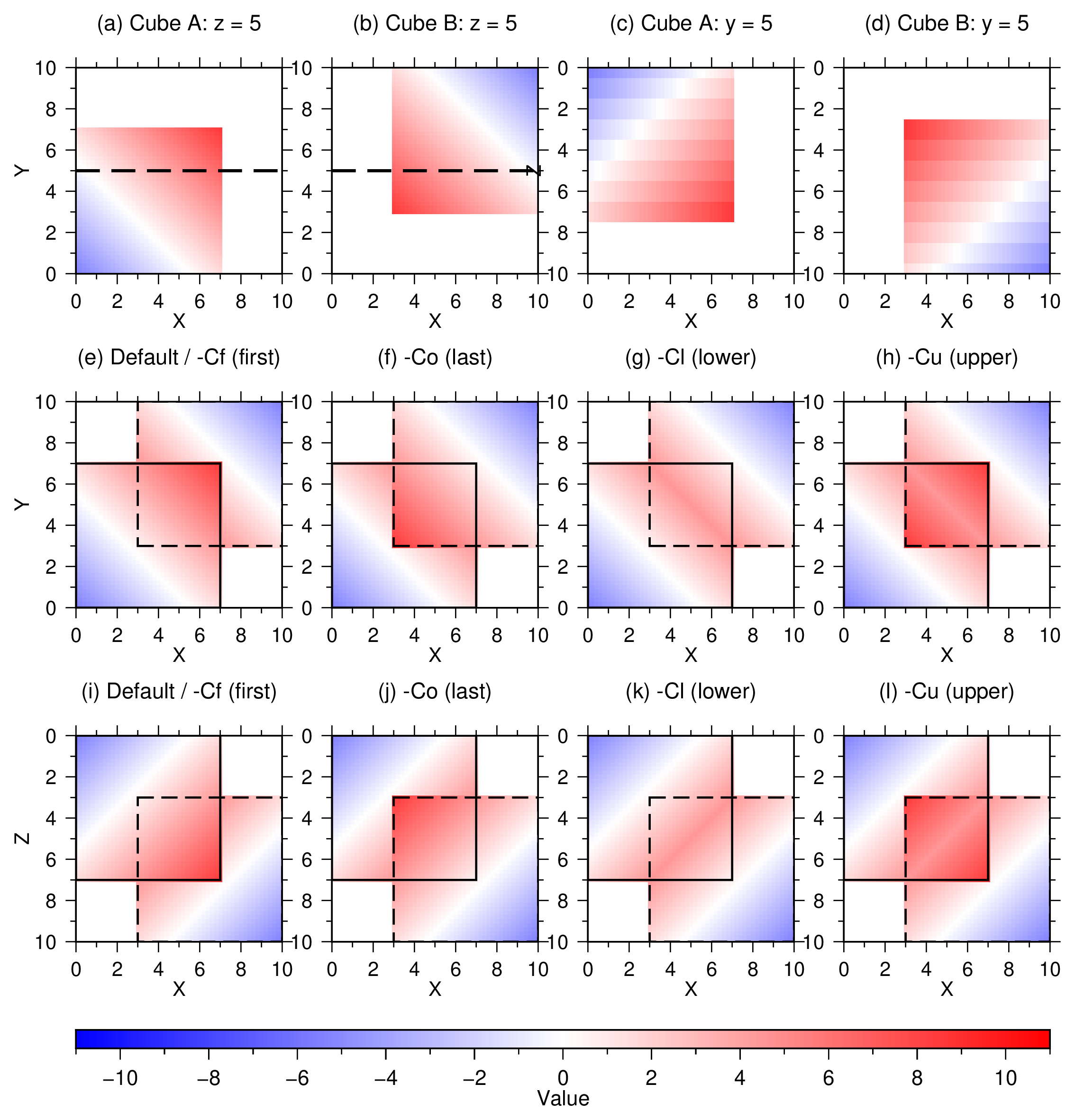
This example compares the four merge3d clobber modes using two synthetic
cubes. Cube A occupies 0/7 along x, y, and z and contains
A = x + y + z - 10.5. Cube B occupies 3/10 along each axis and contains
B = 19.5 - x - y - z. The values cross within their shared volume, so the
lower- and upper-value modes select parts of both cubes.
Supplying the cubes directly uses first-value clobbering by default. The example compares this result with:
-Cf: retain the first available value-Co: retain the last available value-Cl: retain the lower available value-Cu: retain the upper available value
Panels (a-d) show the input cubes. Panels (e-h) show horizontal slices through
the four outputs at z = 5, and panels (i-l) show the corresponding vertical
sections along y = 5. Solid and dashed outlines identify the domains of cubes
A and B, respectively. Dashed black lines in panels (a) and (b) show the
vertical-profile location. The z axis increases downward in the vertical
sections.
Run:
./ex01_clobber.sh
The script creates ex01_clobber.png and ex01_clobber.pdf.
Figures