Examples
The examples are stored in doc/examples. See the doc/examples/README.md file for more instructions.
gnuplot is used to generate the plots in the examples. If gnuplot is not installed, you can still run
the examples and use a different plotting tool of your choosing to visualize the results.
ex01_monotone
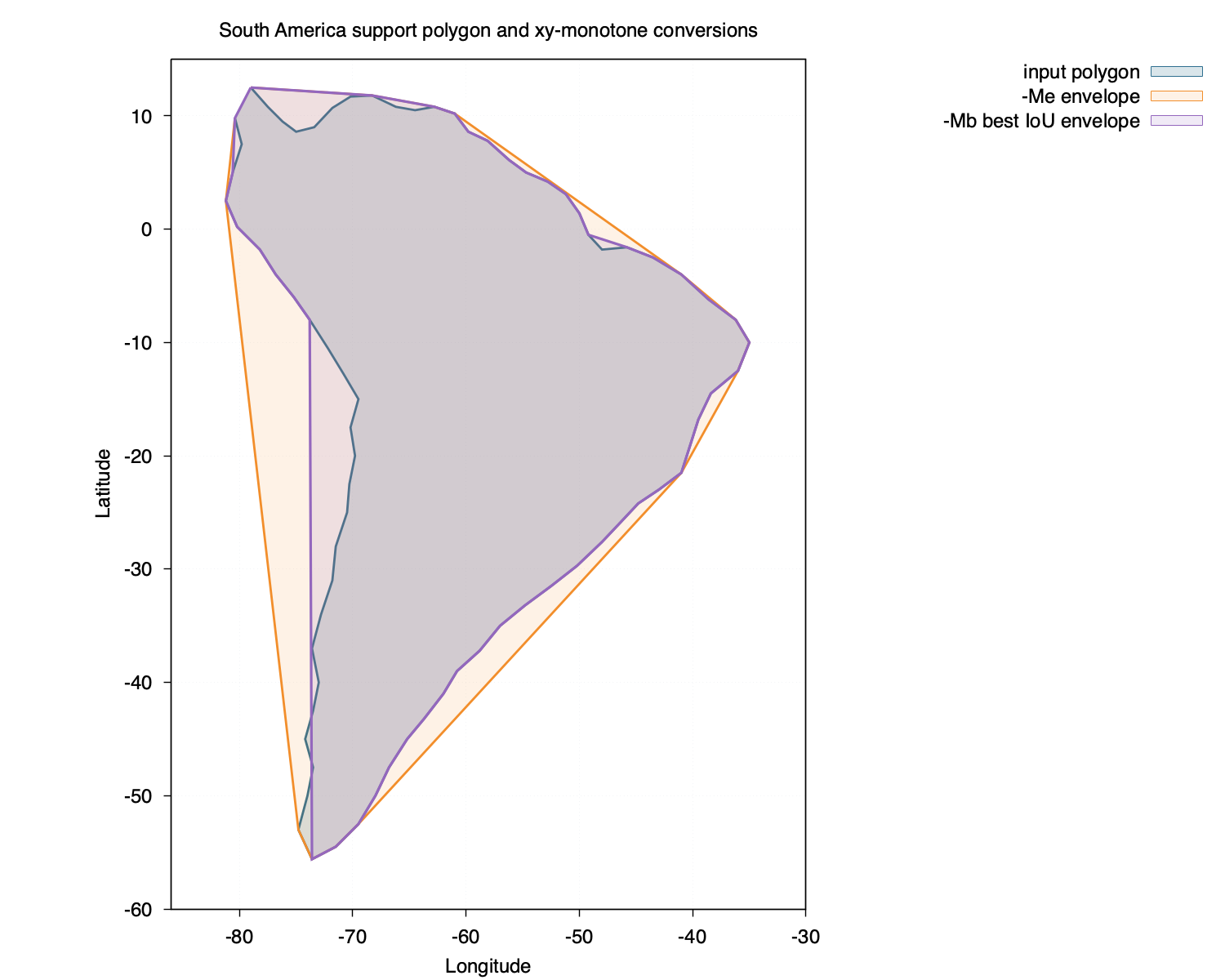
ex01_monotone In this example, we download a crude outline of South America and convert it to a monotone
polygon using the envelope -Me and piecewise-envelope -Mb option of the monotone module.
The resulting monotone polygons are written and compared to the original in the plot.
#!/bin/sh
set -eu

if [ "${BLEND:-}" ]; then
    blend_program=$BLEND
elif [ -x "../../../build/blend" ]; then
    blend_program="../../../build/blend"
else
    blend_program="blend"
fi

input="south_america.txt"
status_output="ex01_status.txt"
envelope_output="south_america_envelope.txt"
best_output="south_america_monotone.txt"
best_plot_output="south_america_monotone_plot.txt"

"$blend_program" monotone "$input" > "$status_output"
"$blend_program" monotone -Me "$input" > "$envelope_output"
"$blend_program" monotone -Mb -G256/256 "$input" > "$best_output"
awk 'NR == 1 {first = $0} {print} END {if (NR > 0) print first}' "$best_output" > "$best_plot_output"

printf 'Wrote %s, %s, %s, and %s\n' "$status_output" "$envelope_output" "$best_output" "$best_plot_output"
ex02_window2d
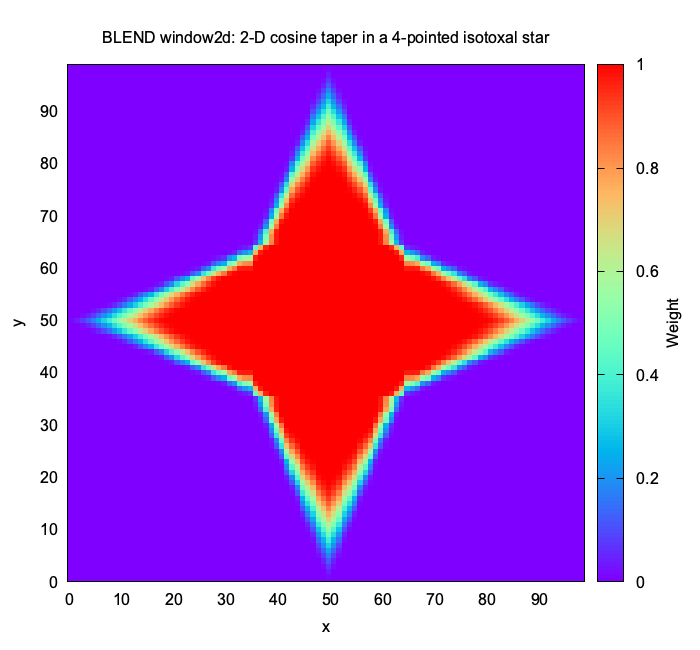
ex02_window2d In this example, we localize a 2-D cosine window in an isotoxal star using the window2d
command-line module.
#!/bin/sh
set -eu

if [ "${BLEND:-}" ]; then
    blend_program=$BLEND
elif [ -x "../../../build/blend" ]; then
    blend_program="../../../build/blend"
else
    blend_program="blend"
fi

rm -f ex02_window2d.txt

"$blend_program" window2d -R0/99/0/99 -I1 -Bisotoxal_star.blend | \
awk '
    NR == 1 {y = $2}
    NR > 1 && $2 != y {print ""; y = $2}
    {print}
' > ex02_window2d.txt

printf 'Wrote ex02_window2d.txt\n'
Below are the contents of the isotoxal star blendfile (i.e., isotoxal_star.blend) used in this example:
isotoxal_star.txt cosine/cosine 0.2/0.2/0.2/0.2
ex03_window2d
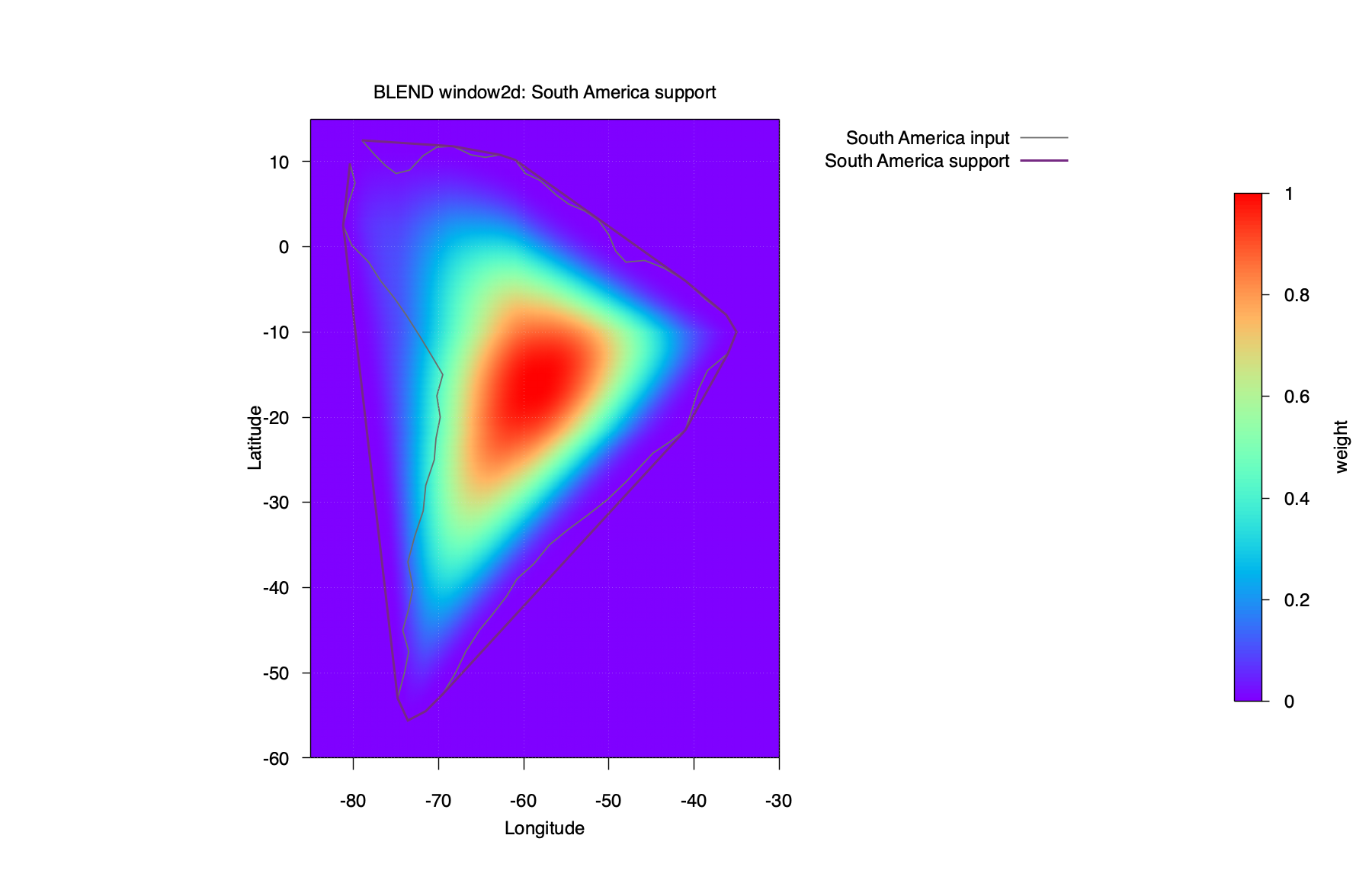
ex03_window2d In this example, we localize a 2-D cosine window function over South America.
We first make the polygon monotone using the strict-envelope -ME option, and write the modified polygon by
supplying the -N option. The plot shows the results of the original polygon, the modified polygon, and the
localized window function. The -MB option gives a more refined polygon that is closer to the original,
as we see in ex01_monotone, but the shape includes an overhang that can make the function localization
awkward. So, -MB is still experimental for localization.
#!/bin/sh
set -eu

if [ "${BLEND:-}" ]; then
    blend_program=$BLEND
elif [ -x "../../../build/blend" ]; then
    blend_program="../../../build/blend"
else
    blend_program="blend"
fi

rm -f ex03_window2d.txt ex03_window2d_grid.txt ex03_window2d_nonzero.txt

"$blend_program" window2d -R-85/-30/-60/15 -I0.1 -Bsouth_america.blend -Cp -ME -N | \
awk -v nonzero="ex03_window2d_nonzero.txt" '
    $3 > 0 {print > nonzero}
    NR == 1 {y = $2}
    NR > 1 && $2 != y {print ""; y = $2}
    {print}
' > ex03_window2d_grid.txt

printf 'Wrote ex03_window2d_grid.txt and ex03_window2d_nonzero.txt\n'
Below are the contents of the South America blendfile (i.e., south_america.blend) used in this example:
south_america.txt cosine/cosine 0.49/0.49/0.49/0.49
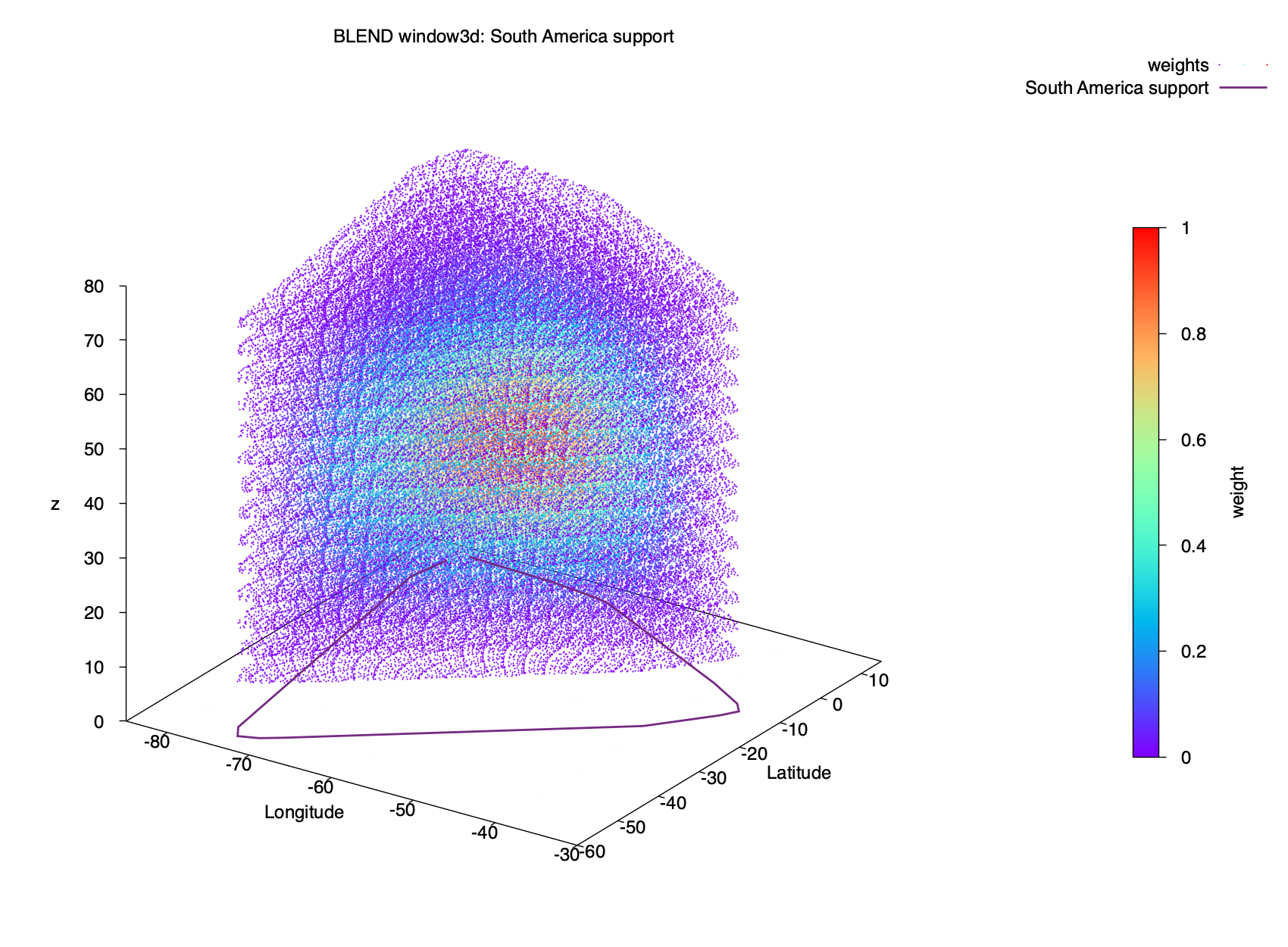
ex04_window3d
ex04_window3d uses the same xy support as ex03_window2d and adds a
vertical dimension and taper for South America.
#!/bin/sh
set -eu

if [ "${BLEND:-}" ]; then
    blend_program=$BLEND
elif [ -x "../../../build/blend" ]; then
    blend_program="../../../build/blend"
else
    blend_program="blend"
fi

rm -f ex04_window3d.txt ex04_window3d_nonzero.txt

"$blend_program" window3d -R-85/-30/-60/15/0/80 -I0.1/0.1/5 -Bsouth_america.blend -Cp -ME -N | \
awk '$4 > 0 {print}' > ex04_window3d_nonzero.txt

printf 'Wrote ex04_window3d_nonzero.txt\n'
Below are the contents of the South America blendfile (i.e., south_america.blend) used in this example:
south_america.txt 10 75 cosine/cosine/cosine 0.49/0.49/0.49/0.49/0.49/0.49
ex05_window2d
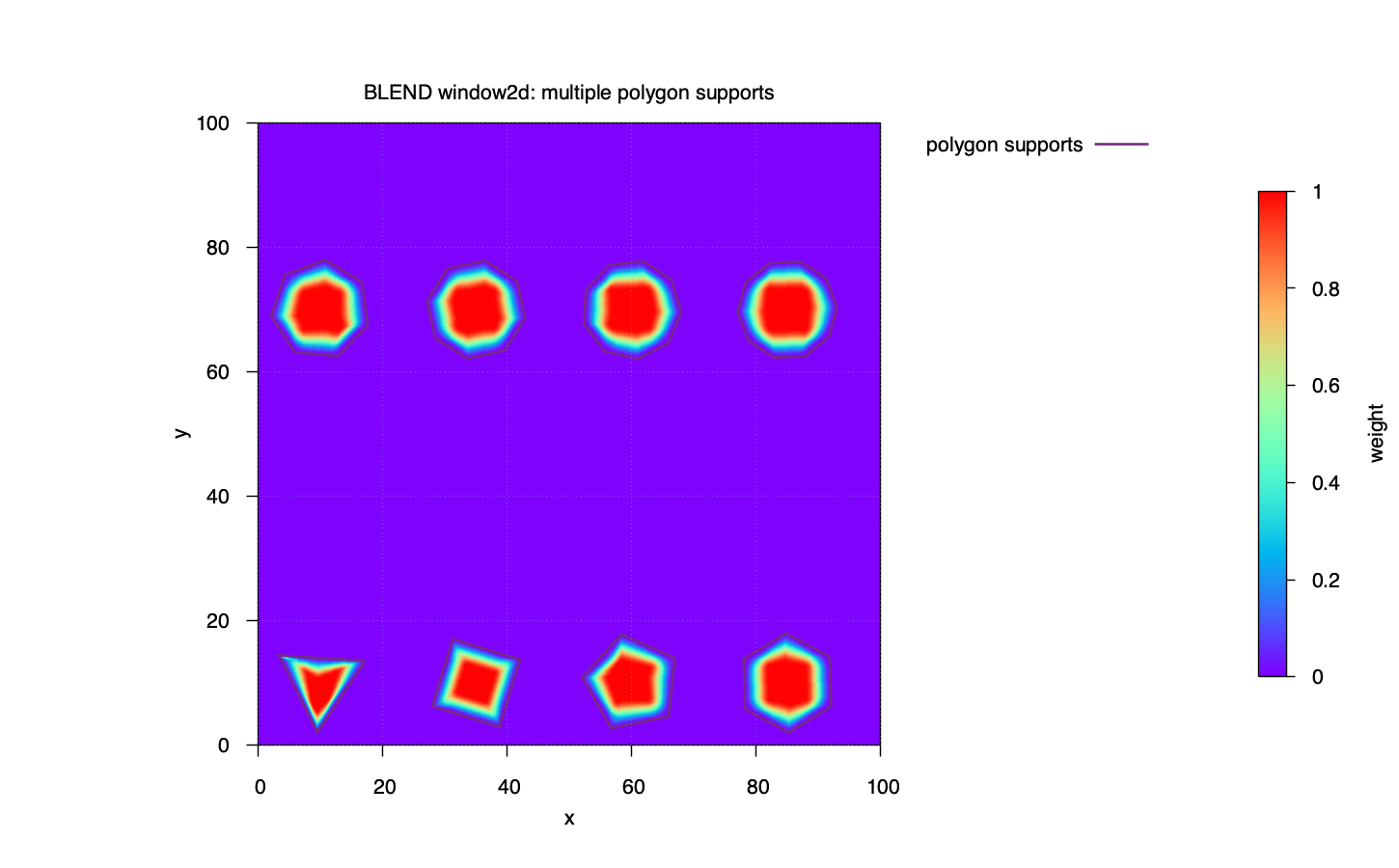
ex05_window2d This example shows how to define multiple supports in a domain.
Here, we define eight different supports in one blendfile. The supports are regular
polygons from a triangle through a decagon, arranged in two rows within -R0/100/0/100.
Every support uses cosine tapers with symmetric taper ratios of 0.3.
#!/bin/sh
set -eu

if [ "${BLEND:-}" ]; then
    blend_program=$BLEND
elif [ -x "../../../build/blend" ]; then
    blend_program="../../../build/blend"
else
    blend_program="blend"
fi

rm -f ex05_window2d_grid.txt ex05_window2d_polygons.txt

"$blend_program" window2d -R0/100/0/100 -I0.1 -Bpolygons.blend -Cp | \
awk '
    NR == 1 {y = $2}
    NR > 1 && $2 != y {print ""; y = $2}
    {print}
' > ex05_window2d_grid.txt

while read -r polygon function taper; do
    [ -n "$polygon" ] || continue
    first_line=$(sed -n '1p' "$polygon")
    sed -n 'p' "$polygon" >> ex05_window2d_polygons.txt
    printf '%s\n\n' "$first_line" >> ex05_window2d_polygons.txt
done < polygons.blend

printf 'Wrote ex05_window2d_grid.txt and ex05_window2d_polygons.txt\n'
Below are the contents of the blendfile (i.e., polygons.blend) used in this example:
triangle.txt cosine/cosine 0.3/0.3/0.3/0.3
square.txt cosine/cosine 0.3/0.3/0.3/0.3
pentagon.txt cosine/cosine 0.3/0.3/0.3/0.3
hexagon.txt cosine/cosine 0.3/0.3/0.3/0.3
heptagon.txt cosine/cosine 0.3/0.3/0.3/0.3
octagon.txt cosine/cosine 0.3/0.3/0.3/0.3
nonagon.txt cosine/cosine 0.3/0.3/0.3/0.3
decagon.txt cosine/cosine 0.3/0.3/0.3/0.3